loading...


.jpg.jpeg)
The Internship Interview Question Nobody Expects
You're in your final year of college. Placement season is here. You've applied to 30 companies. You get interviews at Truechip, Qualcomm, AMD, and a startup doing RISC-V design.
The interviewer looks at your resume and asks:
"Show me something you've built."
You panic internally. Your college assignments? Generic stuff everyone does. Copied online from previous years students. Nothing that shows you actually understand VLSI.
Your GitHub? Empty. Or worse, full of random projects with no README, no documentation, no evidence of real thinking.
Outcome: You don't get the internship.
Meanwhile, your classmate gets three offers. Their GitHub has 5 polished VLSI projects. Each one tells a story. Their resume links directly to working designs. Their LinkedIn shows real accomplishment.
What's the difference?
She built a portfolio, not just a resume.
This is the gap between students who struggle to find internships and students who have companies competing for them.
And the best part? You can start building this portfolio right now. You don't need to be a genius. You don't need to have 10 years of experience. You just need to be intentional about what you build in college.
This guide shows you exactly how.
.jpg.jpeg)
Why Your College Coursework Isn't Enough (Hard Truth)
Your college assignments teach you concepts. They don't teach you professional standards.
Compare:
Recruiters know the difference instantly.
Here's what happens:
What recruiters actually look for:
Your portfolio proves you can do all 6.
The 5 Projects Every VLSI Student Should Build (Difficulty: Easy to Hard)
Here's the truth: You don't need 20 projects. You need 5 really good ones.
Building 5 excellent projects is 100x better than 20 mediocre projects.
These 5 are chosen because:
Project #1: Parameterized Shift Register (Difficulty: Easy | Timeline: 2 weeks)
Why this project:
What to build: A configurable shift register with:
Why recruiters like this:
What your GitHub should include:
.jpg.jpeg)
README should include:
Interview question you'll get: "Why did you make the width parameterizable? What are the trade-offs?"
Expected: "Parameterization allows the same design to work for different data widths. Trade-off is synthesis time and potential timing issues at larger widths."
Estimated time: 2 weeks (design 3 days, verification 5 days, documentation 4 days)
Project #2: FIFO (First-In-First-Out) Memory (Difficulty: Medium | Timeline: 3 weeks)
Why this project:
What to build: A configurable async FIFO with:
Why this is impressive:
Your GitHub structure:
.jpg.jpeg)
What makes this stand out:
Interview questions:
Expected: "Binary counters can have multiple bits flipping simultaneously. Gray code ensures only 1 bit flips between consecutive values, preventing CDC metastability."
Expected: "The write data is discarded and full flag stays asserted. In production, the protocol ensures you don't write when full."
Estimated time: 3-4 weeks (design 5 days, verification 7 days, synthesis 2 days, documentation 5 days)
Bonus point: Get this working in actual synthesis tools (Vivado, Design Compiler). Screenshot the synthesis report. Shows you can actually synthesize.
Project #3: Finite State Machine (FSM) - UART Receiver (Difficulty: Medium | Timeline: 2.5 weeks)
Why this project:
What to build: A UART (serial communication) receiver that:
Why recruiters love this:
Your GitHub structure:
.jpg.jpeg)
What makes this exceptional:
Interview goldmine questions:
Estimated time: 2.5-3 weeks (design 4 days, verification 6 days, documentation 4 days)
Project #4: Configurable ALU (Arithmetic Logic Unit) (Difficulty: Hard | Timeline: 3 weeks)
Why this project:
What to build: An ALU supporting:
Why this impresses recruiters:
Your GitHub structure:
.jpg.jpeg)
What makes this stand out:
Interview questions:
Estimated time: 3-4 weeks (design 6 days, verification 8 days, synthesis 3 days, documentation 5 days)
Bonus: Implement this in an actual synthesis tool (Cadence, Synopsys). Include synthesis reports in GitHub. This single thing puts you in the top 5% of college portfolios.
Project #5: Configurable Cache Subsystem (Difficulty: Very Hard | Timeline: 6-8 weeks)
Why this project:
What to build: A fully functional cache system with:
Why this is a career changer:
Your GitHub structure:
.jpg.jpeg)
What makes this absolutely standout:
Interview questions (Senior-level):
Estimated time: 6-8 weeks (design 10 days, verification 12 days, synthesis 5 days, analysis & documentation 8 days)
Reality check: Only do this if you've nailed projects 1-4. Don't start with this.
Portfolio Quality Checklist: What Separates Great from Average
Code Quality (40% of evaluation):
Testing & Verification (30% of evaluation):
Documentation (20% of evaluation):
Professional Presentation (10% of evaluation):
How to Actually Get This Done (Timeline)
Semester 1 (4 months)
Semester 2 (if interested)
Time investment: 2-3 hours per week if focused. Less if you're in a structured course.
The Trick: Do one project at a time. Polish it completely. Then move to the next. Don't start 5 projects and finish 0.
GitHub Best Practices for VLSI Projects
What your repo should look like:
.jpg.jpeg)
Critical: Your README should include:
Pro tips:
LinkedIn & Resume Impact
Your portfolio becomes your resume's talking points.
Instead of:
"VLSI Design Course - Designed a counter and FIFO"
You now say:
"Designed parameterized async FIFO with proper CDC synchronization, 16x oversampling UART receiver, and configurable ALU - published on GitHub with comprehensive testbenches and 95%+ verification coverage."
Recruiter reaction: "This person knows their stuff. Let's interview."
Your LinkedIn should link to:
Your resume should highlight:
Example:
Async FIFO Design (Verilog, SystemVerilog)
The Tools You Actually Need (Free/Student Options)
| Tool | Purpose | Cost | Notes |
| Vivado | Simulation + Synthesis (Xilinx) | Free | Industry standard for FPGA, includes free license |
| Verilator | Simulation (free, open-source) | Free | Fast, good for large designs, learning curve |
| GTKWave | Waveform viewer | Free | Essential for debugging, free |
| VCS | Simulation (Synopsys) | Paid/Student | Industry gold standard, may have student license |
| Cadence Xcelium | Simulation | Paid/Student | Professional tool, sometimes in colleges |
| ModelSim | Simulation (Mentor) | Free/Paid | User-friendly, free edition available |
Realistic path for college:
You don't need to buy anything. Work with what you have.
The Secret Weapon: Synthesis Results
Here's what separates top portfolios from average ones:
Average portfolio:
Great portfolio:
How to do this:
This shows you think about real hardware constraints, not just RTL correctness.
Interview Prep from Your Portfolio
Each project becomes an interview question:
Interviewer: "Walk me through your UART receiver design."
You:.
The interviewer is impressed because you understand real constraints, proper synchronization, and verification.
Common Mistakes Students Make (Avoid These)
| Mistake | Why It Hurts | How to Fix |
| 1 GitHub project, barely finished | "Why didn't you keep working?" | Build 5 solid projects, not 1 messy one |
| No documentation | "Can't understand what this does" | Add detailed README with diagrams |
| Simulation-only | "Did you verify it synthesizes?" | Run synthesis, include reports |
| No testbench | "How do I know it works?" | Comprehensive testbench required |
| Copied code from internet | "Is this really your work?" | Original code + design decisions documented |
| No version control | "You don't know Git?" | Use GitHub, make meaningful commits |
| Unorganized files | "This looks amateur" | Follow standard directory structure |
| Last commit 1 year ago | "You abandoned this?" | Keep projects updated, recent commits |
What Happens When You Build This Portfolio
Scenario 1: Internship Applications
Before portfolio:
With portfolio:
Companies literally contact you first because your GitHub proves you can build.
Scenario 2: The Interview
The interviewer asks, "Tell me about a complex problem you solved."
Without a portfolio: "Uh... we designed a cache in my class, but it was group work..."
With portfolio: "Let me show you the async FIFO I designed. Here's the GitHub. The tricky part was the CDC synchronizers, so I..."
The interview goes from awkward to impressive.
Scenario 3: After You Get Hired
Your manager asks: "Can you own this UART interface?"
New hire without portfolio: "I did one in college... I think?"
New hire with portfolio: "I designed a complete UART receiver with oversampling and error handling. I understand the edge cases. Let me take this."
You're trusted with real work immediately.
The 6-Month Roadmap to Killer Portfolio
| Month | Focus | Deliverable |
| Month 1 | Project #1: Shift Register | Polished GitHub repo, clean code, comprehensive tests |
| Month 2 | Project #2: FIFO | GitHub repo, CDC explanation, synthesis results |
| Month 3 | Project #3: UART | GitHub repo, protocol documentation, state machine diagram |
| Month 4 | Project #4: ALU | GitHub repo, synthesis reports (area/timing/power), golden model |
| Month 5 | Portfolio polish | GitHub optimizations, LinkedIn updates, resume refinement |
| Month 6 | Advanced elective (Project #5 or advanced techniques) | Additional project or deep dive into one area |
Time commitment: 10-15 hours per week for 6 months = 260-390 hours total
That's less than 4 full-time weeks of work to build a portfolio that changes your career.
Most students waste more time on social media in a month.
How Futurewiz Accelerates Portfolio Building
Here's the honest truth: You can build this portfolio on your own.
But you can accelerate it massively with structured guidance.
The Futurewiz Portfolio Accelerator Course includes the following:
Typical Futurewiz student: Completes 5-project portfolio in 12-14 weeks (vs. 24 weeks solo)
Plus, you get feedback from someone who reviews RTL for a living. That feedback is worth months of self-learning.
The Network Effect
Here's something nobody talks about: Your portfolio is your network.
When you finish a killer UART receiver on GitHub:
When you have 5 polished projects on GitHub with thousands of views:
This is why building a real portfolio matters more than anything else in college.
Final Checklist: Are You Ready to Start?
Before you begin, make sure:
If you checked 8+ boxes → Start building your portfolio today.
If you checked <8 boxes → Get clearer on your goals first. Talk to someone who's done this.
Next Steps: Start Right Now
This week:
Next week: 6. Finish shift register RTL code 7. Write a comprehensive test bench. 8. Run simulations and capture waveforms 9. Document with diagrams
Month 1: 10. Push polished project #1 to GitHub. 11. Start Project #2: FIFO
Your Competitive Advantage
Let's be real: Your college degree doesn't make you a VLSI engineer.
But a GitHub with 5 polished projects? That makes you unemployable at low salaries.
Every company you interview at will see you as someone who:
That's rare. That's valuable. That's why you'll get better offers, better roles, better mentorship.
90% of students are building résumés. The 10% building portfolios.
Guess which group gets the best opportunities?
What's Your Next Move?
Option 1: Build Portfolio Solo
Option 2: Accelerate with Futurewiz
The choice is yours. But choose now—and actually start.
Don't read this article, nod your head, and do nothing.
Your future employers are looking at GitHub right now. Is yours impressive?
Ready to build your portfolio? Start with Futurewiz Portfolio Accelerator – structure, guidance, and mentorship.
Already building projects solo? Share your work with us – we might feature your projects on our platform.
 How a Chip is Built: A Complete Guide for Final Year Engineering Students
 Verilog vs SystemVerilog - A Complete Guide for VLSI Learners
 How to Build a Killer VLSI Portfolio in College (5 Projects Every Student Should Do)
 RTL Design Best Practices That 90% of Freshers Ignore (But Companies Love)
 Digital VLSI vs Analog VLSI vs Mixed-Signal – Which One Should You Choose in 2026?
 Designing VLSI Circuits for Quantum Machine Learning Algorithms
 Online vs. Traditional VLSI Physical Design Courses: Pros and Cons
 Advances in VLSI Design for Artificial Intelligence Applications
 Choosing the Right VLSI Training Institute: Factors to Consider
 VLSI Design for Energy-Efficient Wireless Sensor Networks
 How to Become a VLSI Chip Designer: A Beginner's Roadmap for 2026
 A to Z on India, Japan & the Future of Semiconductor Industry: A New Chapter in Tech Collaboration
 RTL Design vs Physical Design: What's the Real Difference?
 The Future of the Semiconductor Industry: What Indian Students Should Know
 Top 7 Career Paths After Completing a VLSI Course
 Best Time Management Tips for Students Preparing for VLSI Careers
 Mastering VLSI Physical Design: A Comprehensive Course Overview
 The Complete FPGA and ASIC Guide
 Verilog Essentials: Mastering the Fundamentals of Hardware Description Language
 Unleashing the Power of System Verilog: A Comprehensive Guide for Aspiring Designers
 Demystifying VLSI chip Design: Exploring the Core Concepts of VLSI Courses
 Basics of VLSI - An Ultimate Guide
 Career Prospects After Completing A VLSI Course
 Top 5 Reasons To Take Up A Professional VLSI Course
 Mastering VLSI Design: A Comprehensive Guide To Understanding Complex Integrated Circuits
 Future-Proof Your Career With A VLSI Course: How Learning About Integrated Circuits Can Boost Your Job Prospects?
 System Verilog: An Overview
 Introduction to Hardware Description Language (HDL)
 Unlock The Potential Of VLSI Design With An Integrated VLSI Course Online
 Universal Verification Methodology:An Efficient Verification Approach
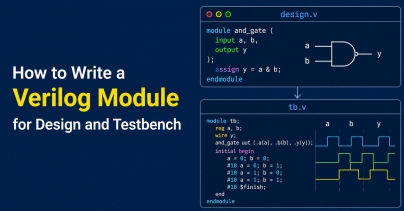 How to Write a Verilog Module for Design and Testbench
 What Are the Different Career Paths in the VLSI Industry?